
Search
As a team's work piles up - tasks, long threads of comments, documents, the files your agents produce, the skills they can run - you need one fast way back to any of it. Hezo has a global search palette: open it from anywhere, type, and jump straight to the result.
Open it with the search box in the top bar, or the keyboard shortcut ⌘K (Ctrl+K on Windows and Linux), from any page.
What it searches
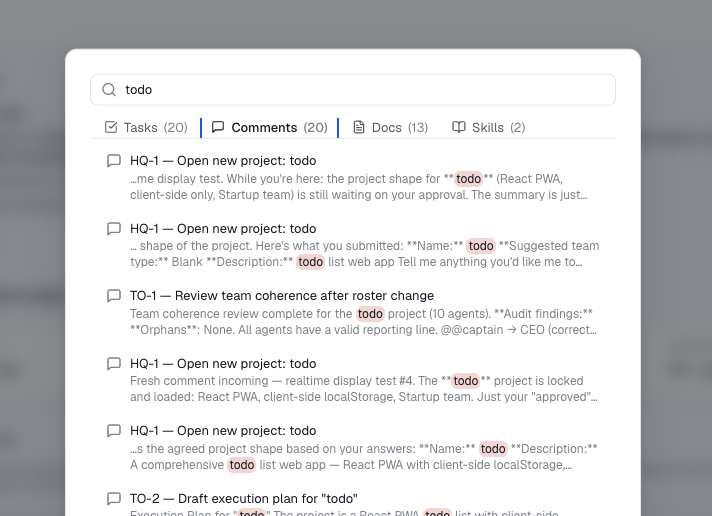
One query covers five kinds of content, and the results are split into a tab per kind with a count - so you can see at a glance where the matches are and switch between them:
- Tasks - by title and description.
- Comments - the discussion threaded on every task.
- Documents - your project documents.
- Assets - the files in your assets library. See below for exactly what is matched.
- Skills - the reusable skills your agents can run.
Pick a result to go straight to it: a task or comment opens that task (a comment match scrolls to the exact comment), a document opens the document, an asset opens it in the asset viewer, and a skill opens its settings. The palette closes behind you.
Finding a file in the assets library
Every asset is searchable by its name, folders included - so a query for hero,
launch or png all reach launch/hero-image.png. You do not have to remember which
folder something went in.
Assets that hold text are searched by their contents as well: markdown reports and
blog posts, plain text, HTML, SVG, and the script and data formats stored as text
(.sh, .py, .js, .ts, .json, .csv, .yaml). So a phrase you remember from a
report finds the report. For HTML and SVG it is the visible text that is indexed, not
the markup, so you match the words on the page rather than its tags and class names.
Everything else - images, PDFs, audio, video and archives - matches on its name only. Hezo does not look inside a picture or unpack an archive to index it.
Your agents search the same library through the full_text_search tool, which is how they
find and reuse work an earlier run already produced instead of rebuilding it.
One search, every team
The palette searches across all the teams you can access at once - you don't pick a project first, and HQ is included like any other team. Skills are global, so they turn up wherever you search. Scoping is enforced on the server: content from a team you can't see never appears in your results.
Keyword search, with highlighting
Hezo runs a full-text search over your content: it matches the words you type - and their grammatical variants, so "logins" finds "login" - and ranks the strongest matches first, with titles weighted above body text. Where your words appear they're highlighted in the snippet. Type at least two characters to begin, and results refine as you type.
Indexed on your own server
Search runs entirely on your own server - your tasks, comments, documents and files are never handed to an outside search service, in keeping with the rest of Hezo. The index is built right into your database and kept in sync automatically, so new or edited content is findable the instant you save it: there's no model to download and nothing to wait for.
An asset's contents are indexed at the moment it is saved. Assets already in your library when you upgraded to a version with asset search are findable by name straight away, and pick up content search the next time they are saved.